Showing posts with label Jar. Show all posts

Saturday, September 19, 2015

How To Set Eclipse Build Path For Niagara-AX


The Eclipse Niagara Plugin handles editing the Eclipse project build path to include module JAR file dependencies when a new module is created through the New AX Module wizard. It may not always be possible to include a module as a dependency through the wizard.
The Eclipse project Referenced Libraries build path can be set directly from within Eclipse to reference the necessary module JAR files which enable syntax checking in the Eclipse IDE.
To add a module JAR file dependency, right click on the Java project in the Eclipse IDE. In the context menu that displays, select the Build Path option. From this option, select Configure Build Path....

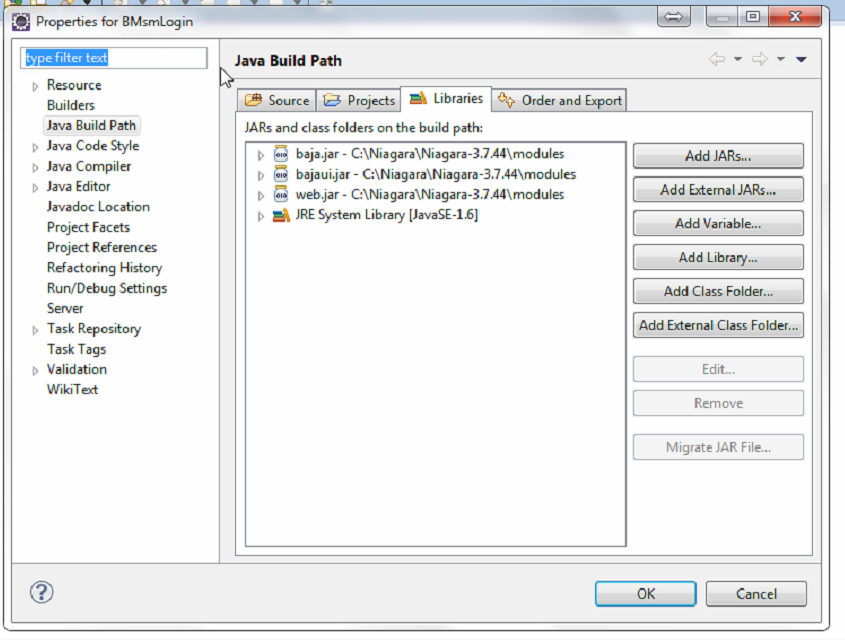

The Properties dialog for the Java project will display. Within this dialog, ensure that the Java Build Path tree menu item is selected and displaying in the main dialog view. Select the Libraries tab from the display tab options. 


From the button panel of the Libraries tab, click the Add Variable... button. The New Classpath Entry dialog will display.  


In the dialog list select the NIAGARA_HOME variable entry. This is the environment variable which points to the Niagara installation on your development platform.
Click the Extend... button. The Variable Extension dialog will display.


From the dialog list, select the modules directory. The module tree will expand to display all module JAR files in the directory.
Select the module you wish to include on the build path by clicking the module. Once selected, click the OK button of the Dialog. The dialog will close.
To save your changes to the Java project build path, click the OK button of the Properties dialog. The build path of the Java project will be updated with the reference to the module JAR file.


Saturday, September 5, 2015

Niagara AX Community Modules

The project consists of a library of modules for the Tridium Niagara AX platform distributed under GPL license. AX programmers are encouraged to use and expand the library.

There is a lot of nice stuff in this module from enum to boolean, dropdown menu for px pages and  more. Check it out. 

Download it from source forge:
http://sourceforge.net/projects/niagaraaxcommun/files/latest/download

Thursday, September 3, 2015

Chrome says it no longer supports the Niagara ax wbapplet plug-in

Upon a log-in attempt via chrome, wbapplet does not start and the browser states "This plug-in is not supported."

There are changes Java compatibility in Chrome:

NPAPI support by Chrome

The Java plug-in for web browsers relies on the cross platform plugin architecture NPAPI, which has long been, and currently is, supported by all major web browsers. Google announced in September 2013 plans to remove NPAPI support from Chrome by "the end of 2014", thus effectively dropping support for Silverlight, Java, Facebook Video and other similar NPAPI based plugins. Recently, Google has revised their plans and now state that they plan to completely remove NPAPI by late 2015. As it is unclear if these dates will be further extended or not, we strongly recommend Java users consider alternatives to Chrome as soon as possible. Instead, we recommend Firefox, Internet Explorer and Safari as longer-term options. As of April 2015, starting with Chrome Version 42, Google has added an additional step to configuring NPAPI based plugins like Java to run — see the section Enabling NPAPI in Chrome Version 42 and later below.

Enabling NPAPI in Chrome Version 42 and later
As of Chrome Version 42, an additional configuration step is required to continue using NPAPI plugins.
  1. In your URL bar, enter:  chrome://flags/#enable-npapi 
  2. Click the Enable link for the Enable NPAPI configuration option.
  3. Click the Relaunch button that now appears at the bottom of the configuration page.